
Step 1: Navigate to the Integrations Page
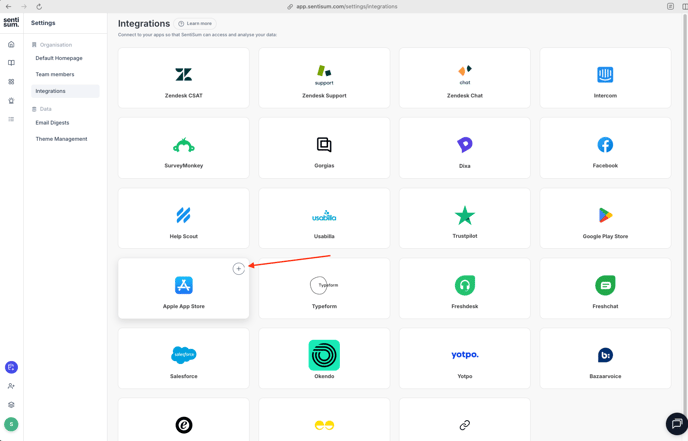
- Go to SentiSum Integrations page and locate "Apple App Store".
- Click on the "+" (Add Integration) button.
- Reference Screenshot
Step 2: Add Your App URL(s)
-
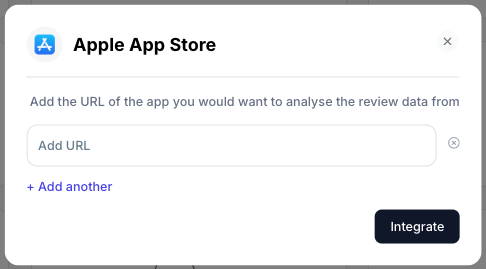
A pop-up window titled “Apple App Store” will appear.
-
Paste the full URL of your app from the Google Play Store in the field provided.
📌 Important: The URL should be similar to this format below:
<https://apps.apple.com/uk/app/app_name/app_id>
-
To add multiple apps, click “+ Add another” and enter additional URLs.
-
Reference Screenshot
Step 3: Integrate
- Once all relevant URLs are added, click “Integrate.”
Step 4: Successful Integration & Data Processing
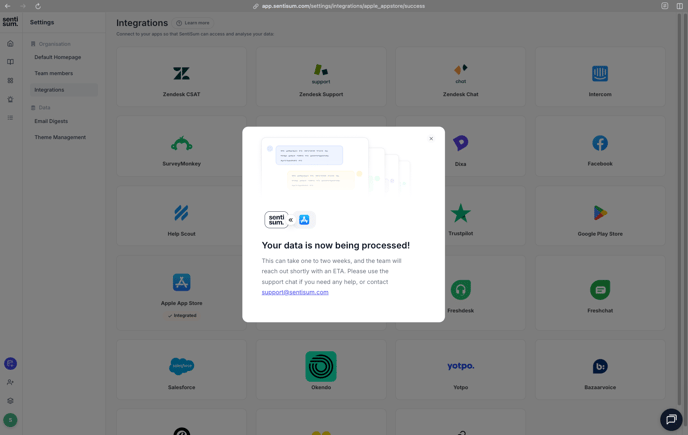
- Once authorization is successful, SentiSum will display a confirmation message:
- “Your data is now being processed!”
- SentiSum team will notify you once the integration is complete.
- Reference Screenshot
💬 Need Help?
If you face any issues or need assistance:
- Use the in-app support chat on the bottom right corner, or
- Email us at support@sentisum.com